

Working remotely with Dynamics 365 Business Central
These past 6 months, many of us have adapted to working from home full-time and may not be returning to the office any time soon. Companies and employees are beginning to see the benefits of working remotely. Even after restrictions are lifted, it is expected many companies will continue to operate flexible working policies.
With Microsoft Dynamics 365 Business Central, it is possible to work anywhere, at any time. This means remote or home-working employees have access to all of the necessary tools and information they need to be productive and stay connected.
Business Central can be deployed on-premises or on the cloud. As modern technology advances, we are seeing constant growth in the number of companies choosing cloud deployment. This has many advantages, including a huge reduction in hardware costs and no longer having to install the software on every users computer. A user can simply log in from any device, at any time.
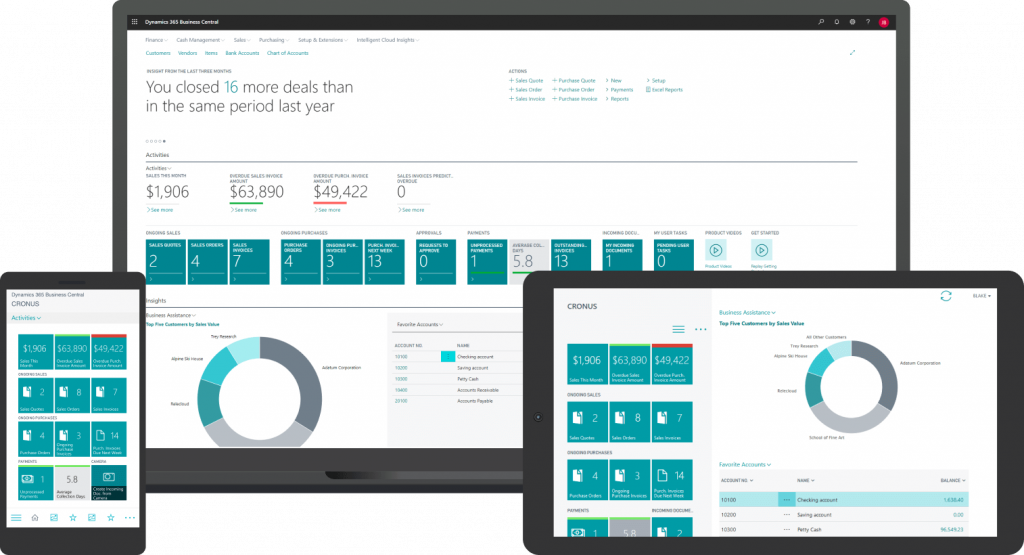
The primary client for Business Central is the web client, however, a mobile and tablet client are also available. The web client delivers a user-friendly interface that is compatible with all web browsers. This provides users with quick and easy access to the entire system.
Whilst the web client can do everything, the mobile and tablet client are great for accessing a simplified version of Business Central, either at your desk or on the go. If you need a quick, high-level overview of a specific sale, target or business area, you can simply take out your phone, check the Business Central app and find out what you need to know in a matter of seconds.
Dynamics 365 Business Central is a comprehensive, all-in-one business management system with many features that can be of benefit as a company adapts to increased remote working.
October 5, 2020
RECENT POSTS

What Should UK Construction Firms Look for When Choosing an ERP System?
What Should UK Construction Firms Look for When Choosing an ERP System? At a Glance Construction firms need ERP systems that can connect financial information with the realities of managing multiple projects, budgets, resources and [...]

Is Business Central the Right ERP for a Growing Wholesale or Distribution Business?
Is Business Central the Right ERP for a Growing Wholesale or Distribution Business? At a Glance Growing wholesale and distribution businesses can outgrow spreadsheets and legacy systems as order volumes, inventory, locations and operational complexity [...]

What Is Group Making Tax Digital and Does It Apply to Your Business?
What Is Group Making Tax Digital and Does It Apply to Your Business? At a Glance Group Making Tax Digital applies MTD for VAT requirements to businesses registered with HMRC as a VAT group. Member [...]